


interactive 3D configurators
3D Product Configurators
Your customers build their own version of the product: sizes, colours, materials and add-ons. They see it in photorealistic 3D, know the price instantly and can place it in their room with their phone. We handle the 3D model, the configurator and the shop integration end to end.
12 years
of experience in 3D graphics
AR
on Android and iPhone, no app needed
1 link
for every configuration
100%
tailored to your product
[ SEE HOW IT WORKS ]
Configure. See the Price. Order
[ TOP-LEVEL REALISM ]
See That Realism? That’s What Sets Us Apart.
These are not static images or a simple spin of pre-made pictures. Every variant is a real 3D model rendered live in the browser, with realistic light, materials and shadows.
PBR
Physically based materials
Oak, brass, opal glass or matt finishes: every surface reacts to light the way it does in real life.
60 fps
Real-time rendering
360° rotation, zoom and variant changes without reloading the page. On less powerful devices the configurator switches off the heaviest effects by itself.
1:1
True to the original
We build the model from your CAD files or photos, keeping the product’s proportions and details.
[ MODULES ]
What the LightVision Configurator Can Do
AR module
The customer places the configured product in their room through the phone camera, at real scale. It works on Android and iPhone, with no app to install.
Live pricing
Base price plus surcharges for the selected options, recalculated with every change. You manage option prices and availability yourself in the admin panel.
Cart or quote request
The finished configuration goes into the cart of your shop, or arrives as a quote request with the full configuration: selected options, price and a link to the preview.
A link for every configuration
The share button copies a link to exactly this version of the product. Customers can send it to their family or come back to it later.
Rendered in the browser
PBR materials, shadows, reflections and 360° rotation. Works in Chrome, Edge, Safari, Firefox and Opera, on desktop and mobile.
AI module on request
A visual of the configured product in a finished interior, created with the help of AI. We build this module for each project individually. See how we create AI visualisations.
This is not an off-the-shelf template. We keep developing the configurator engine and tailor every implementation to the specific product: its options, compatibility rules, prices and the way it is sold. If your product needs a feature that doesn’t exist yet, we build it as part of the project.
[ FOR E-COMMERCE ]
A configurator plugged into your shop
[ FOR MANUFACTURERS ]
Sales through reps and dealers
[ PROCESS ]
From Product to Launch
01
Brief and materials
Photos, drawings or CAD. We agree on the options, compatibility rules, prices and the scope of modules.
02
3D model + PBR
We build an optimised model with realistic materials and lighting.
03
Configurator + logic
Options, prices, configuration links and AR. We show the first product on a test page for your approval.
04
Integration and launch
We embed the configurator on your website, connect the cart or quote requests, test everything and go live.
Shop integration
The configuration goes into your shop’s cart with the correct price and all options, or arrives as a quote request. We adapt the integration to the platform you sell on. The configurator runs on our platform, and your website only needs a short script.
[ BUILT AROUND YOUR PRODUCT ]
A 3D Configurator Built Around Your Product
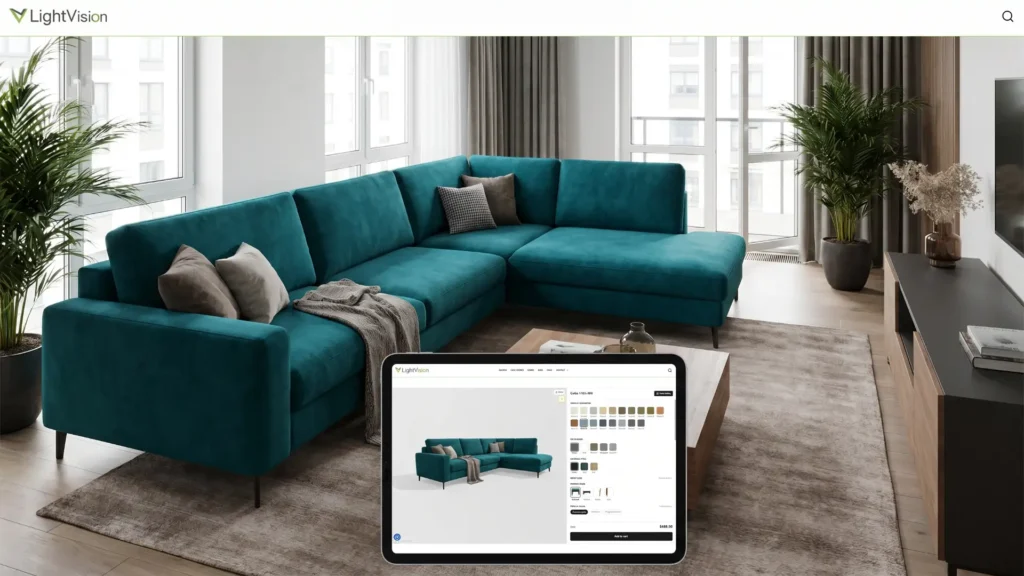
[ UPHOLSTERY, SIZE, COLOUR ]
3D Furniture Configurator: the Customer Designs, the Price Updates Itself
The customer picks the size, material, upholstery colour and finish, and sees the finished piece straight away in photorealistic 3D. Every combination has its own link and price, and the finished configuration can be added to the cart or sent as a quote request. One configurator replaces hundreds of variant photos. For the same furniture we also create packshots and lifestyle scenes.
[ DESIGN THE FACADE IN 3D ]
3D House Configurator: Every Finish Option
The customer chooses the facade colour, windows, doors, roof and finishes of their future home. Prefab and timber-frame house builders can show every variant before the contract is signed, instead of handing over a printed catalogue. For houses we build the configurator either on a 3D model or on photorealistic renders, when the realism of the whole building and its surroundings matters most. We describe the second approach below, using Unno houses as an example.


[ SEE IT IN YOUR OWN ROOM ]
3D Configurator with AR: the Product in Your Own Space
Once the product is configured, the customer taps ‘View in AR’ and sees it in their room through the phone camera, at real scale and in the chosen materials. It answers the most common doubt when buying online: will it fit my interior? The AR model is generated automatically from the current configuration, with no app to install.
[ MODULE ON REQUEST ]
Configurator with AI: the Product in a Finished Interior
The AI module shows the configured product in a styled interior, not just on a white background. The product comes from the 3D model, so it matches the selected version, while AI builds the room around it. We create this module on request, for a specific product and brand style.


[ SALES REPS AND DEALERS ]
A Configurator for B2B Sales
Not every product is sold through a cart. A sales rep configures the product together with the client in a meeting, or the client does it on the website, and you receive a request with the full configuration and price. On request we can add separate dealer prices and volume discounts.
[ A LIGHTER ALTERNATIVE ]
Interactive 360° Product Views
Not every product needs a full configurator. When it is enough to show it from every side, we create an interactive 360° view: the customer rotates the product and zooms in on details, while hotspots and short animations show how it works. It is made from the same 3D model as the product packshots, so it is easy to add to product pages in your shop.

[ A CONFIGURATOR BUILT ON RENDERS ]
House Facade Configurator for Unno
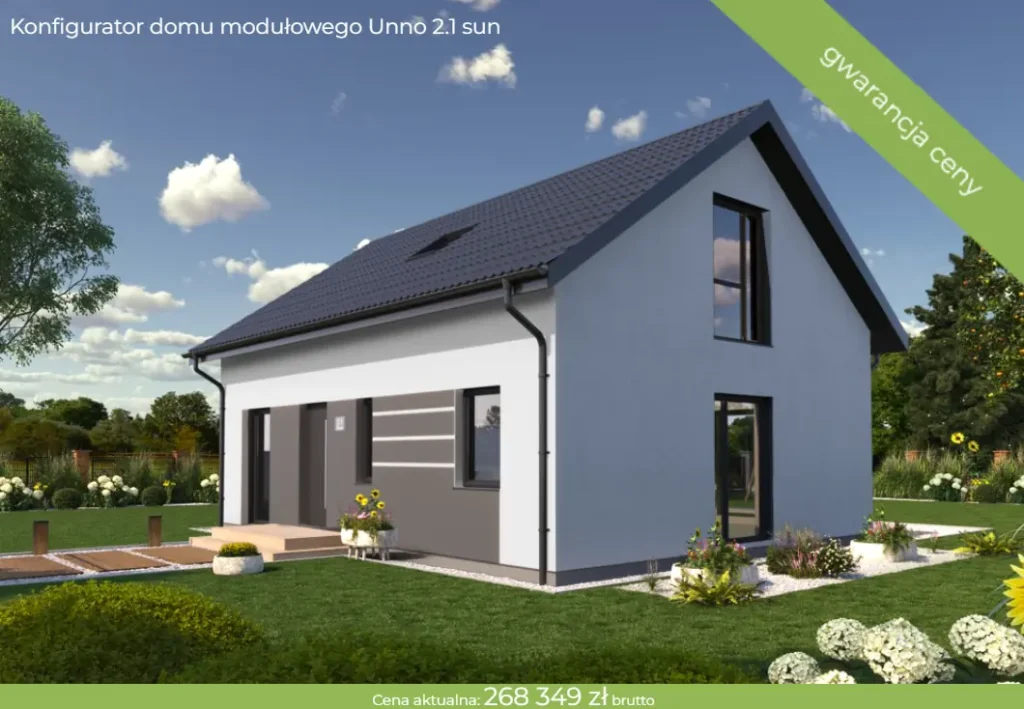
Not every configurator has to be a 3D model in the browser. For Unno, a modular house builder, we built a facade configurator on photorealistic renders. Every finish option is a separate layer prepared from a render, and the configurator combines them into an image of the house in its garden. The customer doesn’t rotate a model, but sees their house in render quality, with real light and surroundings.
This approach works well for buildings and large products, where the realism of the whole scene matters. It runs in any browser and is made from the same scenes we use for renders and animations. The full story is in the Unno case study.


[ NO RISK ]
Top Quality, Every Time
We offer a 100% satisfaction guarantee on all our services. Our team will keep working with you until you are happy with every detail. If the final result doesn’t meet your expectations, you pay nothing, no questions asked. Your satisfaction is our priority, and we won’t stop until you are completely happy.
[ CLIENT REVIEWS ]
Real Stories. Real Results
★★★★★
“We ordered a complete set of materials for our terraced housing development in Września from Lightvision: exterior renders, interiors, 3D floor plans and apartment sheets. The cooperation went really smoothly. Clear arrangements from the start, deadlines met, changes made right away. Highly recommended!”
★★★★★
“Fantastic communication, lightning-fast turnaround and top-quality renders. Piotr is an expert in his field. I recommend him to anyone who wants stress-free cooperation and an excellent visual result. The 3D models and renders are of a very high standard.”
★★★★★
“I worked with Lightvision when we were launching sales of Unno timber-frame houses. At that point we didn’t have a single physical house to show. We ordered exterior renders of every design and 3D animations of the exteriors and interiors. (…) They are still selling.”


[ FREQUENTLY ASKED QUESTIONS ]
Everything You Want to Know About 3D Configurators Before You Get in Touch
Can you build the 3D models from scratch?
Yes. We build the model from CAD or 3D files (e.g. STEP, OBJ, FBX, SKP), technical drawings or product photos. Production CAD models usually need to be simplified and optimised for the web so that the configurator runs smoothly on phones as well.
How is the price calculated in the configurator?
It is the base price of the product plus surcharges for the selected options, recalculated with every change. You manage option prices and availability yourself in the admin panel, for all products at once or for a single one. On request we add separate dealer prices and volume discounts.
Which e-commerce platforms do you integrate with?
WooCommerce, Shopify, Magento, PrestaShop, Shopware, Lightspeed and other platforms. The configuration goes into the cart and the order with all its options, at the same price as in the configurator. We adapt the integration to your shop. On a website without a shop, the configuration arrives as a quote request.
Can the configurator be adapted to my product?
Yes, that is the core of what we do. We don’t sell a ready-made template: we keep developing the configurator engine and tailor every implementation to the specific product, its options, compatibility rules and the way it is sold. If you need a feature that doesn’t exist yet, we build it as part of the project.
How does the AR preview work?
On a phone, the customer taps ‘View in AR’ and sees the product in their own room through the camera, at real scale. It works on Android and iPhone without installing an app, and the AR model is generated automatically from the current configuration.
What is the difference between a configurator and an interactive 360° view?
A 360° view shows a finished product from every angle, with hotspots and animations, but without changing variants. A configurator lets the customer change options and shows the price straight away. A 360° view is simpler and cheaper, and works well for products without many versions.
How long does it take to build a configurator?
A simple product with an existing model usually goes live in 1 to 2 weeks. When we build the 3D model from scratch and the option rules are complex, it usually takes 3 to 6 weeks. After the brief we give you a specific schedule.
Does the configurator work on mobile?
Yes. It runs in the mobile browser without an app, supports touch, and on less powerful phones it switches off the heaviest effects by itself to keep things smooth.
Where is the configurator hosted and what does maintenance cost?
The configurator runs on our platform, 3d.lightvision.pl, and we add a short script to your website. We don’t charge extra for hosting, and we fix any bugs in our work free of charge. New products and materials are quoted separately or as a package.
Can I start with just one product?
Yes, and that is how we usually work. We launch the configurator for one product, see how your customers use it, and then add more. Every further product from the same family, with the same materials, costs noticeably less than the first one.
[ LET’S START ]
Get a Free Quote for Your Configurator
Call or write to us at any time. We do our best to answer every enquiry within 24 hours.
phone:
- Your data is 100% safe with us.
- We never share your data with third parties.
- We usually reply within 24 hours.
- We work with clients all over Europe and beyond.
- Fully remote. No travel costs.
[ SHOW, DON’T TELL ]
Show Your Product the Way the World’s Best Brands Do.
Send us photos, drawings or a model of your product. We will build a working 3D configurator tailored to your range.